C-TIX › Features
All features
Everything C-TIX does for you
From setting up your events to scanning at the door. Everything below is included in every account, for € 1.50 per order. No plans, no subscription, no extras to buy separately.

From setting up your events to scanning at the door. Everything below is included in every account, for € 1.50 per order. No plans, no subscription, no extras to buy separately.
A season, a series or a single night: it all lives in one project.
Set up a series or season as one project, with as many events as you need. Online within ten minutes.
Name, venue, date and time, end of sales, number of seats and your own information text.
Give each event its own image, for example for the concert calendar on c-tix.com.
Regular, reduced, student or a free ticket. With a maximum per category if you like.
A fixed bundle for all concerts, or a pick-your-own bundle in which the buyer chooses a number of events.
Let buyers give a little extra when they order, with suggested amounts.
Early bird and last minute per category, or a price that moves with demand.
A percentage, a fixed amount or a discount per ticket. For a project or a single event, with a maximum and an end date.
Edit all your events in one table, or import them from Excel or CSV.
Your own order page, in your own style.
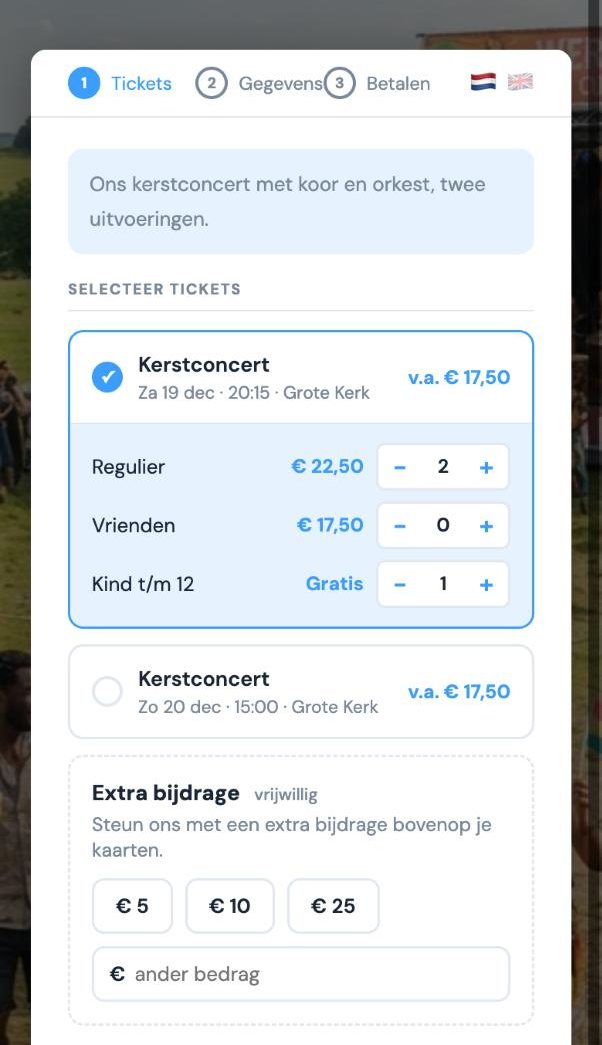
With your name, image, colours and font, and a readable link: c-tix.com/t/your-organisation.
Title, phone, address, postcode, town, comments: per field off, shown or required.
Ask buyers your own question and download the answers.
Headings between events, and events with the same title grouped under one heading.
Show how many seats are left. Once sold out, visitors can join the waiting list.
The form and the emails in two languages, with your own terms or disclaimer.
Past and switched-off events disappear from the form automatically.
Share a link that opens straight at one event, or a link per channel to see where your buyers come from.
Buyers order without leaving your site.
Place the order form on a page of your own website.
A button opens the form above your site. After paying, the buyer is back on the same page.
A button next to each event on your site and a cart in the bottom corner: pay for everything at once. The current price shows in the button, and sold-out events turn grey automatically.
Copy the code per event, or download them all as an Excel file for your web designer.
A QR code to your order page for posters, flyers and programme booklets.
A fair fee and your money every week.
iDEAL and Wero, and the Festival Cadeaukaart gift card. Switch on credit card, Apple Pay and Bancontact if you like.
Not per ticket: four tickets in one order cost € 1.50. No subscription. You decide whether to pass it on to the buyer.
Your balance lands in your own bank account every Wednesday.
Annual and quarterly overview, revenue per project and a final statement per project as PDF. Also as CSV.
A business buyer can request a VAT invoice through the order confirmation email.
Your buyers are well looked after, and you keep the overview.
A PDF ticket and a calendar attachment. Choose a modern or classic ticket, with your sponsors’ logos.
Search, filter, add a note, resend the ticket or cancel an order.
Issue complimentary tickets, with or without an email to the guest.
Right away, or scheduled around the event: a few days before, the day after or with every new order. With merge fields and a test email.
Quick entry, no fuss.

Scan the e-tickets at the door with the free iPhone app.
Check visitors in or undo per event, search by name, and see how many are already inside.
A list of all visitors as PDF or CSV, per event or for the whole project.
A QR code on screen, so visitors without a ticket can order on the spot.
Get to know your audience and reach more people.
All your buyers in one overview: how often they came, when they last came and through which channel. With filters, saved groups and export to Excel.
A map of the Netherlands with the home towns of your buyers. See at a glance where your audience lives, and where you can reach more people.
See per project how much of your audience is new and how much comes back.
Send your news to a selection of buyers who signed up for your newsletter.
Your event in C-TIPS, our newsletter for around 10,000 concert-goers, in the concert calendar on c-tix.com and on our Facebook and Instagram. On or off per event.
Revenue per month, orders over time, occupancy, payment methods and which link people ordered through.
With the whole team, each with the right access.
Administrator, editor, finance, read-only or box office. Invitations go by email.
A simple screen with only the sales figures, for example for whoever runs the box office.
Your details, payment methods, bank account, logo, ticket design, thank-you page and language.
Guidance at every step, a checklist to get started, and you can send us a question or wish in a moment.
An account is free and there is no commitment. You only pay when you sell tickets.